Overview:
We have enhanced the App Approval experience to make Marketplace app management faster, simpler, and more accessible for your account users.
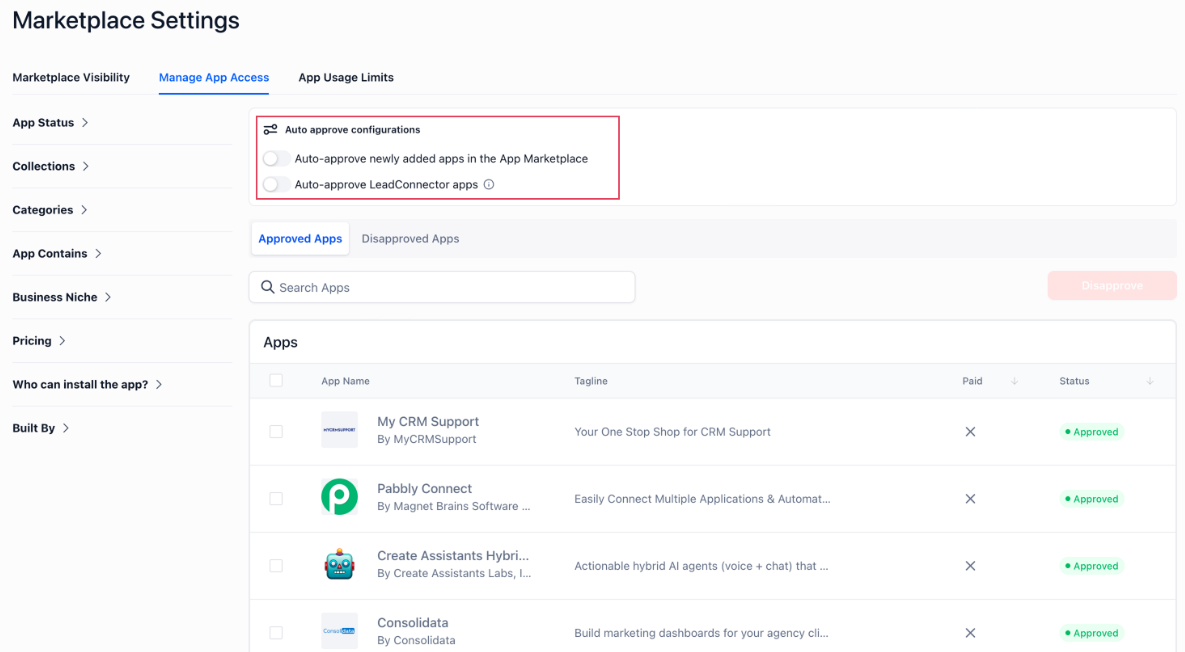
Previously, users had to navigate from All Apps to Approved/Dis-approved Apps to manage approvals. With this update, approval management is now surfaced upfront with dedicated Approved/Disapproved views and new auto-approve controls.
What’s improved
Added dedicated Approved Apps and Disapproved Apps tabs
Added auto-approve toggle for LeadConnector apps
Reduced navigation friction for managing app permissions
How to access
Go to: App Marketplace → Settings → Manage App Permissions
From there, you can:
Manage Approved and Disapproved apps
Configure auto-approve settings
Search and filter apps easily
Why it matters
Makes app permission management faster and easier
Reduces friction while approving/disapproving apps
Simplifies onboarding for trusted LeadConnector apps
Preview:
Was this article helpful?
That’s Great!
Thank you for your feedback
Sorry! We couldn't be helpful
Thank you for your feedback
Feedback sent
We appreciate your effort and will try to fix the article